Better GMail - A great new firefox addon for gmail !!
Tuesday, May 29, 2007
First you need the world's best,fastest, light weight and most secured browser - Firefox
Click banner on the left side bar on the page to download firefox
Then download this Firefox addon by clicking here. https://addons.mozilla.org/en-US/firefox/downloads/file/15710/better_gmail-0.6.1-fx.xpi
You will get a warning..
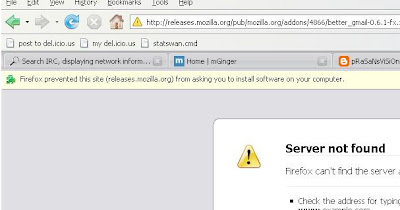
Just click the options button on that yellow bar and give add allow the site. Then it will install the addon.
Conversation preview, Signature float - enable HTML Signature the easiest way, Smart Read button, Customize GMail Sidebar, Skins !!!, Macros, Label Colors, Date Search and lot more....
Yes, all in one pack.
I loved the feature of GMail HTML Signature, its better than all the other methods available currently, because it prevents copy pasting each time. Its like GMail's built-in feature.
Go to Settings > Signature
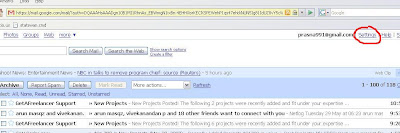
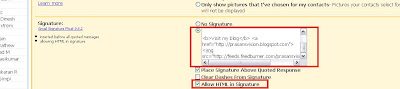
Then go to Signature and enter some html code like shown in screenshot.
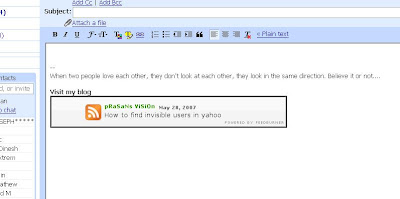
Then go to compose mail and see your html sign working
Another feature i loved is the conversation preview with right click.
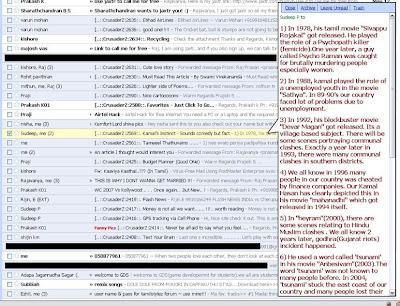
Also the skins look pretty good.
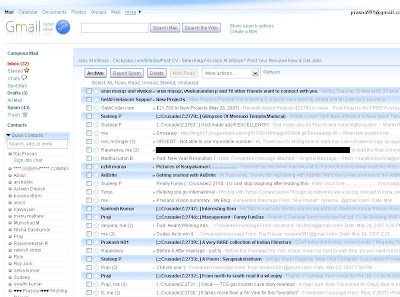
Yes this is nothing but GMail with Better GMail addon... Click to see bigger screenshot.
courtesy: http://prajish.blogspot.com/2007/05/how-tohtml-signature-in-gmail.html
Please post comments about doubts, or more of this kinda information
-Raj
Under
Firefox Tipz,
Googling Google

